
Integrating Google Analytics on a Next.js 13 website can feel a little overwhelming. But fret not! We have two amazing resources to help you through this process, making it a breeze.
-
a 9-minute YouTube video by Ryan Gaudion, specifically focusing on Google Analytics integration with Next.js 13.
-
an article version of Ryan's video, offering the same detailed guidance (just incase you prefer reading).
By following either of these resources, you will successfully integrate Google Analytics into your Next.js 13 website.
However ...
...there's a possibility that your metadata might encounter a bug and stop working correctly. But don't worry, we have a simple fix for that
read [https://www.ioweb.pro/articles/what-metadata-do-i-need-for-best-seo](How To Get Maximum SEO Result From My Metadata.)
The Fix
To fix your metadata issues, just wrap the Google Analytics component in your root layout using suspense like 👇🏾.
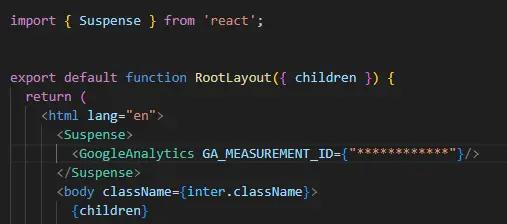
This is how you wrap the Google analytics component in a suspense to make your metadata work on nextjs 13
This small adjustment will prevent any conflicts and keep your metadata intact.
There's another potential error you might face, where 'window.tgag' is undefined. But here's the solution:
head over to your cookie component and wrap the 'window.gtag' part in the useEffect hook with a condition that skips the code when it is undefined like 👇🏾.
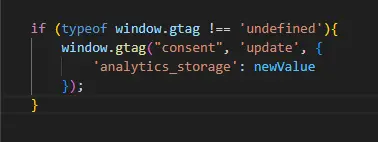
if you encouter a window.gtag not defined problem as well, fix it as shown in this image.
This quick fix will resolve the error and ensure a seamless Google Analytics integration.
so there you have it, the straightforward quick fix to metadata not showing up bug on next js 13 after google analytics integration.
NO ADS HERE! but do get in touch on twitter if you have questions or if you find this article useful.
Enjoy the rest of the day.

Hi! I'm Ibrahim. I collaborate with builders to shape ideas, make smart decisions and deliver results.
Let's Connect